Digital Signature for Vermont Advance Directives
How to Complete A Vermont Advance Directive with Digital Signature
What is a digital signature?
In 2024, Vermont’s advance directive law was updated to allow for digital signatures when signing and witnessing advance directives. This means that you can complete your advance directive entirely on your computer in a PDF file, including signing and witnessing. However, not all electronic signatures are considered valid digital signatures for advance directives, so it is important to use compliant software that properly authenticates your signatures.
What programs can I use to make a valid digital signature?
Vermont’s law relies on individuals using compliant software to execute their digital signatures. The following software can be used for digital signatures on advance directives:
- DocuSign Digital Signature
- Adobe Acrobat Sign Digital Signature
- Only the Adobe Acrobat Sign Digital Signature option meets the requirements – you must be using the paid version of Adobe Acrobat to get the correct Digital Signature option. Adobe Acrobat Standard, Pro, and Creative Cloud Accounts all come with digital signature capabilities.
These two programs meet the NIST requirements for digital signatures because they are able to “detect unauthorized” changes to the signature data and collect enough data to “authenticate the identity of the signatory” (NIST Memo, Digital Signatures, 8/13/2024).
When using these programs, you will upload a PDF version of the advance directive form into your account, and then the software will prompt you to add the digital signature fields. Once your document is filled out, you can digitally sign it before sharing with your witnesses for their signatures. Your witnesses will also need to create accounts with the software of your choice in order to digitally sign the document.
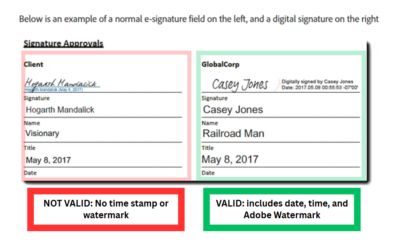
Particularly with Adobe Acrobat Sign, it can be hard to tell if the e-signature is a valid digital signature. Valid digital signatures from Adobe will include the Adobe watermark, as well as the date AND time information of your signature. Here is a side-by-side comparison:
More FAQs
Types of electronic signatures:
“Electronic signature” is a broad term that refers to any kind of signature that you complete on your computer.
Different types of e-signatures:
- Simple Electronic Signatures (SES)
- Advanced Electronic Signatures (AES)
- Digital Signatures, also called Qualified Electronic Signatures (QES)
There are a lot of versions of electronic signatures, but only digital signatures include additional layers of security to lock the content of your document after signing and ensure that someone else cannot falsify your signature. Only digital signatures or physical signatures are permitted for advance directives in Vermont (exception – see remote witnessing).
Review Vermont’s requirements:
Digital Signature Requirements:
(35) “Digital signature” means an electronic identifier that is intended by the individual using it to have the same force and effect as a manual signature and that meets all of the following requirements:
(A) uses an algorithm approved by either the National Institute of Standards and Technology or by the Department of Health;
(B) is unique to the individual using it;
(C) is capable of verification;
(D) is under the sole control of the individual using it;
(E) is linked to data in a manner that invalidates the digital signature if the data is changed;
(F) persists with the document and not by association in separate files; and
(G) is bound to a digital certificate.
In lay-person’s terms, this means that only certain types of electronic signatures are valid digital signatures for completing advance directives in Vermont. If you are hoping to use digital signature for your Vermont advance directive, make sure you have all of the necessary components.
A valid digital signature will require some type of authentication each time you use your digital signature. Most often, this means having an account with the digital signature software and logging in before you begin signing a document. Some digital signature software require a paid account to create a digital signature, and others will allow you to make a free account.
Digital signatures create a PKI certificate (public key infrastructure) to link your account data to your signature. This certificate also prevents your document from being changed after signing. When your digital signature appears in your document, it will also show a date and time stamp or a unique code that is specific to the PKI certificate. This is the most visible difference between digital signatures and other types of e-signatures. Below are some examples of valid digital signatures:
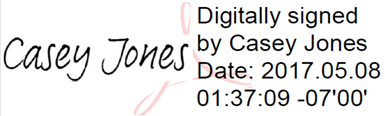
Adobe Digital Signatures (above) display the date and time of your signature and include the Adobe watermark.
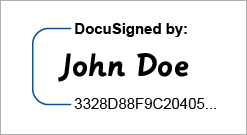
DocuSign Digital Signatures (above) create a unique code that appears beneath your signature.
Signatures that allow you to type your name without any account set-up or password protection are not valid. These signatures do not record any unique information about you that would protect your signature from being forged and will not prevent your document from being edited after signing.
Adobe Acrobat allows for these kinds of simple e-signatures with their free accounts. You must have a paid Adobe Acrobat account to create a valid digital signature. DocuSign allows you to create a free account that will create a valid digital signature.
Sample e-signatures that are not valid for advance directives:

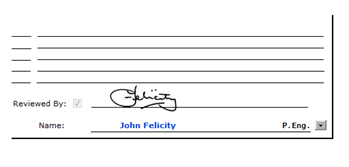
These kinds of e-signatures make a signature that looks like handwriting from your name, but they have no unique code, or date/time information and do not require you to create an account or verify your information.
Option 1:
Sign up for a free DocuSign account and upload a PDF of your advance directive form.
- You can create a DocuSign Account here.
- You can choose your preferred advance directive form from our Forms page and then upload the document into DocuSign to complete it.
- NOTE: The witnesses signing your advance directive will be prompted to create free DocuSign accounts when they sign your document.
Option 2:
Sign up for a paid Adobe Acrobat Pro account and upload a PDF of your advance directive form.
- You can create your Adobe Acrobat Pro account here.
- You can choose your preferred advance directive form from our Forms page and then upload the document into Adobe to complete it.
- NOTE: The witnesses signing your advance directive must also have Adobe Acrobat Pro accounts to witness your document with Adobe Digital Signature.
More questions?
Get more support with your advance directive from the Vermont Ethics Network (VEN). VEN offers customer support for via phone or email from 8:30-4:30 EST, Monday-Thursday.
Call: 802-828-2909
Email: OR
